Specification Management Software Built for Complex Design Projects
From boutique studios to multi-floor hospitality and corporate environments, manage specifications, finishes, and FF&E without spreadsheet chaos.
The Problem
Why Do Design Firms Struggle to Manage Specifications at Scale?
Most interior design studios build their specification workflow in Excel. Not because it is the right tool for the job, but because it is the available one. A spreadsheet for the first project becomes a template for the second, a system for the tenth, and a liability for the twentieth.
The problems are not immediately obvious. A small studio managing two or three straightforward projects can run Excel well with enough discipline. The system holds. But discipline is not infrastructure, and as project complexity increases — more concurrent projects, more SKUs, more stakeholders, more revision rounds — the manual coordination that kept things together starts to fail.
The failure modes are specific.
Version confusion: multiple copies of the same spec in circulation, nobody certain which is current.
Revision cascade: a product change made in one document that was not propagated to five others.
Approval misalignment: the client approved a version that has since been superseded, and nobody noticed until procurement flagged the discrepancy.
Margin leakage: the cost plan and the spec have quietly diverged, and profitability only becomes visible at handover.
In small residential projects, these are inconveniences. In commercial, hospitality, and finish-heavy environments with hundreds of line items and multiple concurrent stakeholders, they are operational risk.
Specification Management Software Defined
What Is Specification Management Software?
Specification management software is a structured system for controlling how product selections, finishes, and FF&E are defined, tracked, revised, approved, and documented across a design project. Unlike spreadsheets, it is built to manage evolving, multi-phase, finish-heavy environments where the same product decision touches multiple documents, multiple stakeholders, and multiple phases simultaneously.
The term covers a range of tools, from lightweight product scheduling platforms aimed at residential designers to enterprise-grade systems built for hospitality rollouts and corporate fit-outs. Understanding what the category must do — and where different tools sit within it — is the starting point for making the right choice.
What Does Specification Management Software Centralize?
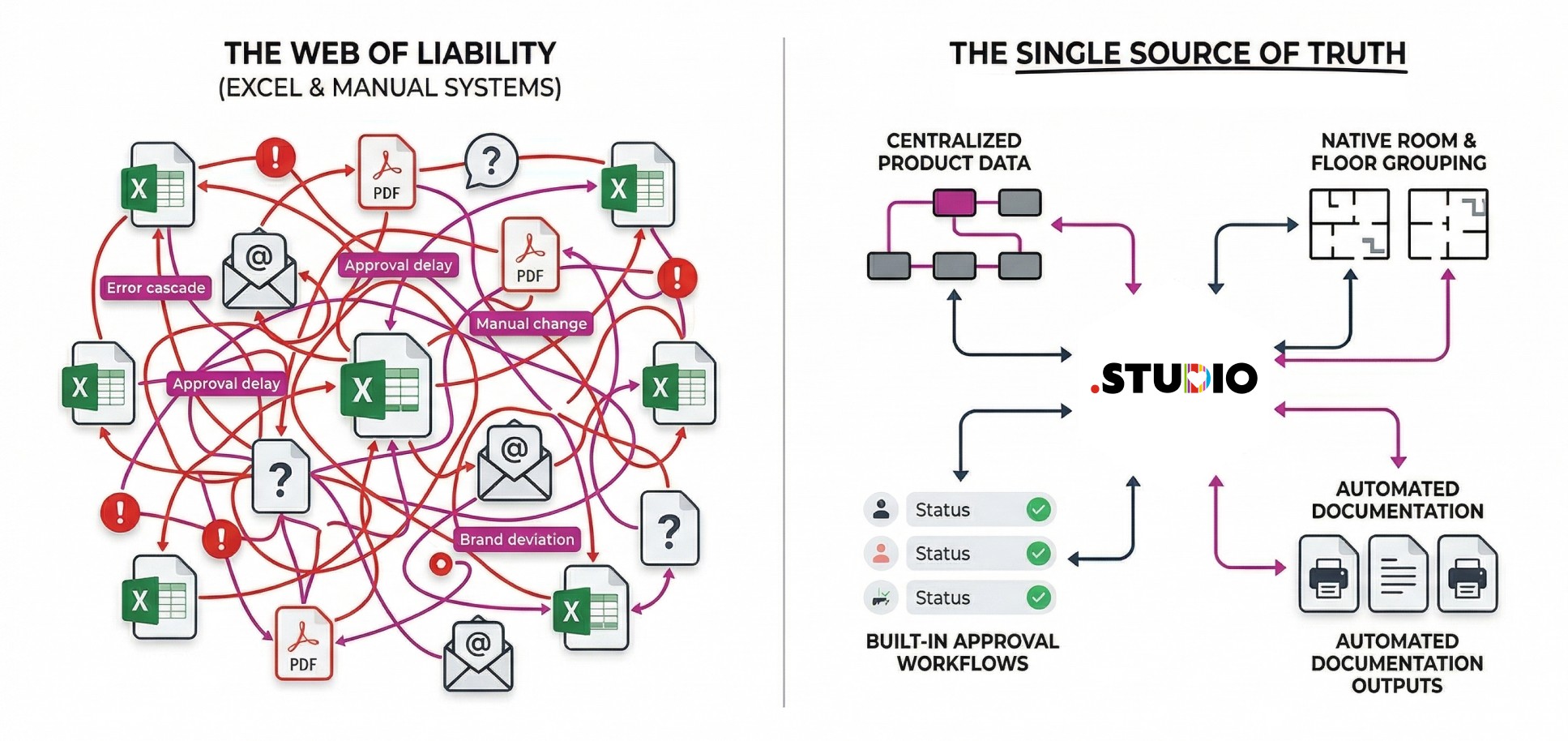
A specification platform replaces the fragmented file stack (spec in Excel, approvals in email, outputs in InDesign, products in shared drives) with a single operational system. At minimum, it centralises:
Room and zone-based product grouping reflecting spatial structure rather than category codes
Linked product and material data with manufacturer, pricing, certification, and delivery information attached
Controlled revision history with automatic change tracking at item level
Multi-level approval workflows embedded in the specification itself, not in adjacent email threads
Real-time visibility across the project for everyone with access
Presentation-ready documentation generated from live data, not manually rebuilt after every revision
What is the difference between a specification system and a specification document?
A specification document is a file. It records decisions made up to the point it was last saved. It does not know when it becomes outdated, it cannot propagate changes to other documents, and it cannot show who approved what at which revision.
A specification system is operational infrastructure. A change made in it propagates automatically to every downstream view. Approvals are attached to the specific version they cover. Outputs are generated from the current state, not from a historical snapshot. The document is a view of the system, not the system itself.
This distinction is what makes a specification system genuinely different from a more carefully maintained spreadsheet.
When does a studio need specification management software?
The threshold is not primarily about headcount. It is about project complexity and concurrent volume. Studios typically reach the point where purpose-built software pays back when they are managing five or more concurrent projects with FF&E budgets above £75k per project, with multiple designers working on the same specification simultaneously. Below that threshold, disciplined spreadsheet management is adequate. Above it, the cost of manual coordination exceeds the cost of replacing it.
A specification document records what was decided. A specification system controls what happens next.
Why excel fails as project complexity grows
When Does Excel Stop Working for Specification Management?
Excel works well at small scale. The problems begin when projects require things that spreadsheets were not designed to do: relate a product to a room and to a cost plan simultaneously, propagate a revision automatically, track an approval against the specific document version it covered, or generate a branded output without a manual formatting session.
These are not workflow problems that better discipline can solve. They are structural limitations. The version conflict is not caused by carelessness — it is caused by a system with no mechanism for maintaining a single authoritative state. The revision that failed to cascade is not caused by forgetfulness — it is caused by a system where propagation is manual by design.
Excel typically fails when design projects include:
Multiple floors or zones
Repeating room types
Hundreds or thousands of SKUs
Layered stakeholder approvals
Frequent revisions across phases
Procurement tracking requirements
At this scale, manual systems cannot maintain structural control.
What Are the Limitations of Excel for Interior Design Specifications?
The limitations that matter in a commercial or hospitality context are precise:
No native room or zone grouping. Products exist in rows. Rooms exist as column headers or tab names. The relationship between them is maintained by convention, not by structure, and convention fails under revision pressure.
No controlled revision history. Excel records the current state of a cell. It does not record what it was before, who changed it, or when. An audit trail requires a separate log maintained by a human.
No structured approval workflow. An approval in a spreadsheet system is typically an email confirmation. It is adjacent to the spec, not part of it, which means the version approved and the version current can diverge without the system noticing.
No automated outputs. A specification book built from an Excel source requires a design session in InDesign or equivalent. After every revision, the output must be rebuilt. For studios issuing multiple document versions per phase, this overhead is significant.
No margin visibility at the point of decision. The cost implication of a product selection is only visible after a manual reconciliation of the spec and the cost plan - two separate documents that need to agree but have no automatic mechanism for doing so.
Generic project management tools fail for a different reason than Excel. Excel is a static data store being asked to behave as a relational system. Generic PM tools organise tasks and activities, not product decisions. A Kanban board has no native understanding that a product belongs to a room, a room belongs to a package, and a package has a cost implication. Putting specification into Asana or Monday produces a task board with a spreadsheet running alongside it, which is the problem the studio was trying to solve.
How to evaluate Specification management Software
What should you look for when choosing specification management software?
Not all specification platforms are built for the same kind of work. A tool designed for residential product scheduling may not handle hospitality room-type propagation at scale. A tool positioned for small studios may not support the concurrent multi-package work that characterises commercial projects. These five questions separate the right choice from the adequate one.
Does it organise by space or by category?
Specification organised by room or zone type reflects how projects are delivered. A change to a room type should propagate to every instance of that type automatically — not require manual location and update across category tabs. A system organised by space handles this natively. A system organised by product category requires manual cross-referencing and fails under revision pressure.
Does it track revisions at item level or at document level?
Document-level version control records that something changed. Item-level revision tracking records what changed, when, by whom, and what the item looked like before. Only item-level tracking makes the pre-procurement consistency check a report rather than a manual exercise, and only item-level tracking enables a meaningful audit trail when disputes arise.
Are approvals embedded in the specification or managed separately?
Approvals managed via email create a version mismatch problem with no automated detection mechanism. The client approved a document that has since been revised, and the system has no way of flagging that the approval record and the current spec have diverged. Approvals embedded at item level, linked to the version that was approved, make the approval chain traceable without searching an inbox.
Are specification outputs generated from live data or rebuilt manually?
A specification book generated from live data is current at the moment of generation. One built manually in InDesign from a spreadsheet that was current three days ago is a snapshot already drifting from the truth. For studios issuing multiple document versions per project phase, the difference between generated and rebuilt outputs is not a convenience question — it is the difference between a 40-minute task and a two-day one.
Does it show margin impact at the moment of product selection?
If the cost implication of a product decision is only visible after a manual reconciliation of the spec and the cost plan, the studio is discovering margin problems rather than preventing them. A specification system that shows margin impact at selection enables course-correction before decisions are confirmed rather than after they are delivered. This is the visibility gap that costs studios the most and is the hardest to see because it never appears as a line item.
Specification management for Complex Project Types
How does specification management software support hospitality and F&B projects?
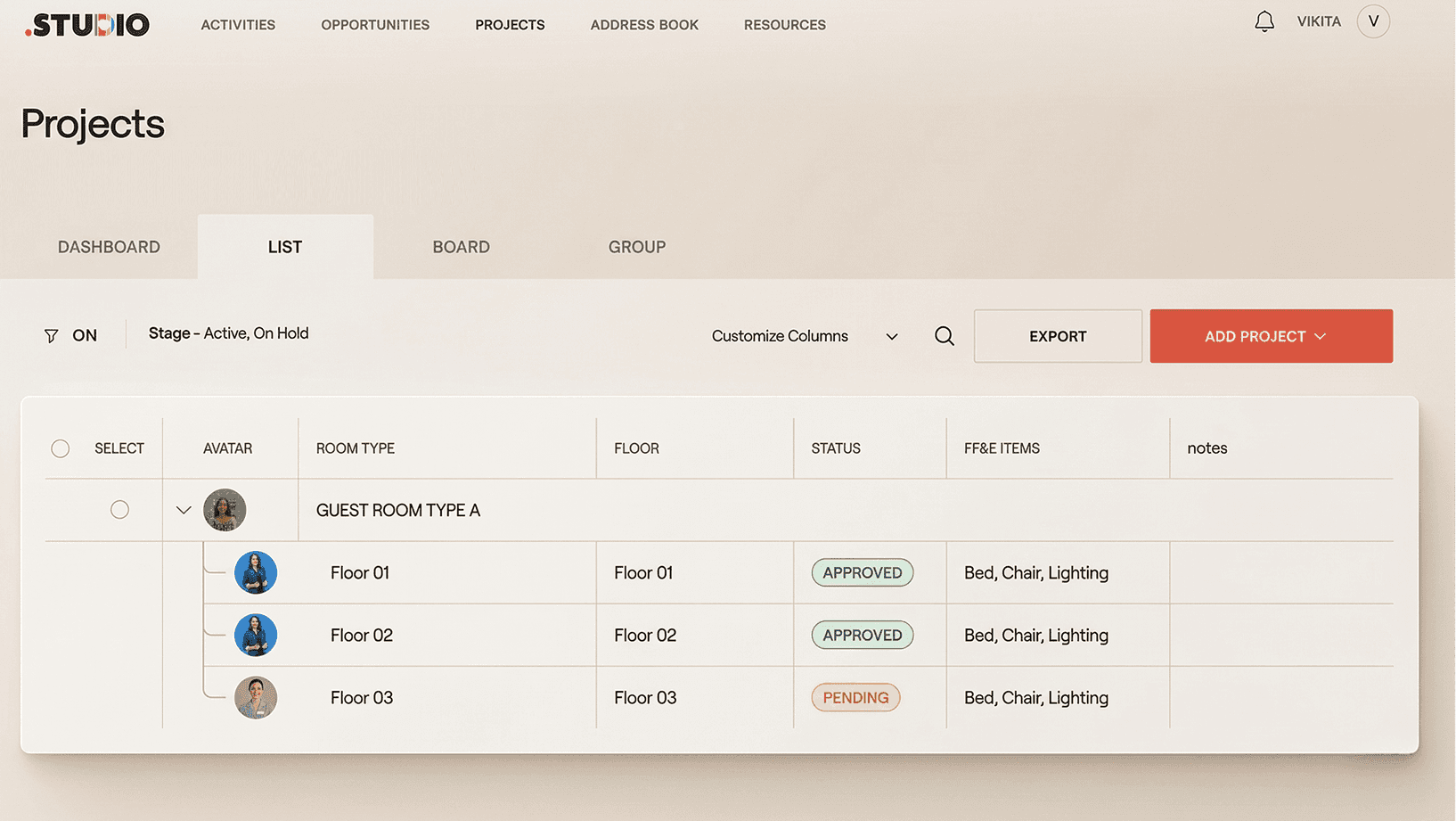
Hospitality specification is not standard interior design work at scale. It is a structurally different problem. Specifications are organised around room types rather than individual rooms, which means a product change in a room type propagates to every instance of that type across the property — potentially hundreds of rooms simultaneously. FF&E and OS&E are interdependent and need to be managed in the same system. Brand standards introduce compliance requirements that must be cross-referenced at every revision round.
A specification system built for hospitality organises by room type and package, handles FF&E and OS&E from the same data source, propagates changes automatically, and maintains revision and approval history across multi-phase rollouts. Studios managing hospitality projects without this infrastructure are absorbing a coordination overhead that is invisible in any single project but substantial across a year.
Hospitality and F&B projects typically involve:
Repeating room types across floors or sites
Strict brand standards
High-volume FF&E schedules
Layered stakeholder approvals
Multi-phase rollouts
Specification management software enables:
Room-based structuring for repeatable layouts
Centralized brand standard control
Linked product and finish records
Revision tracking across properties
Controlled approval workflows
This reduces duplication and ensures consistency across large-scale hospitality environments.
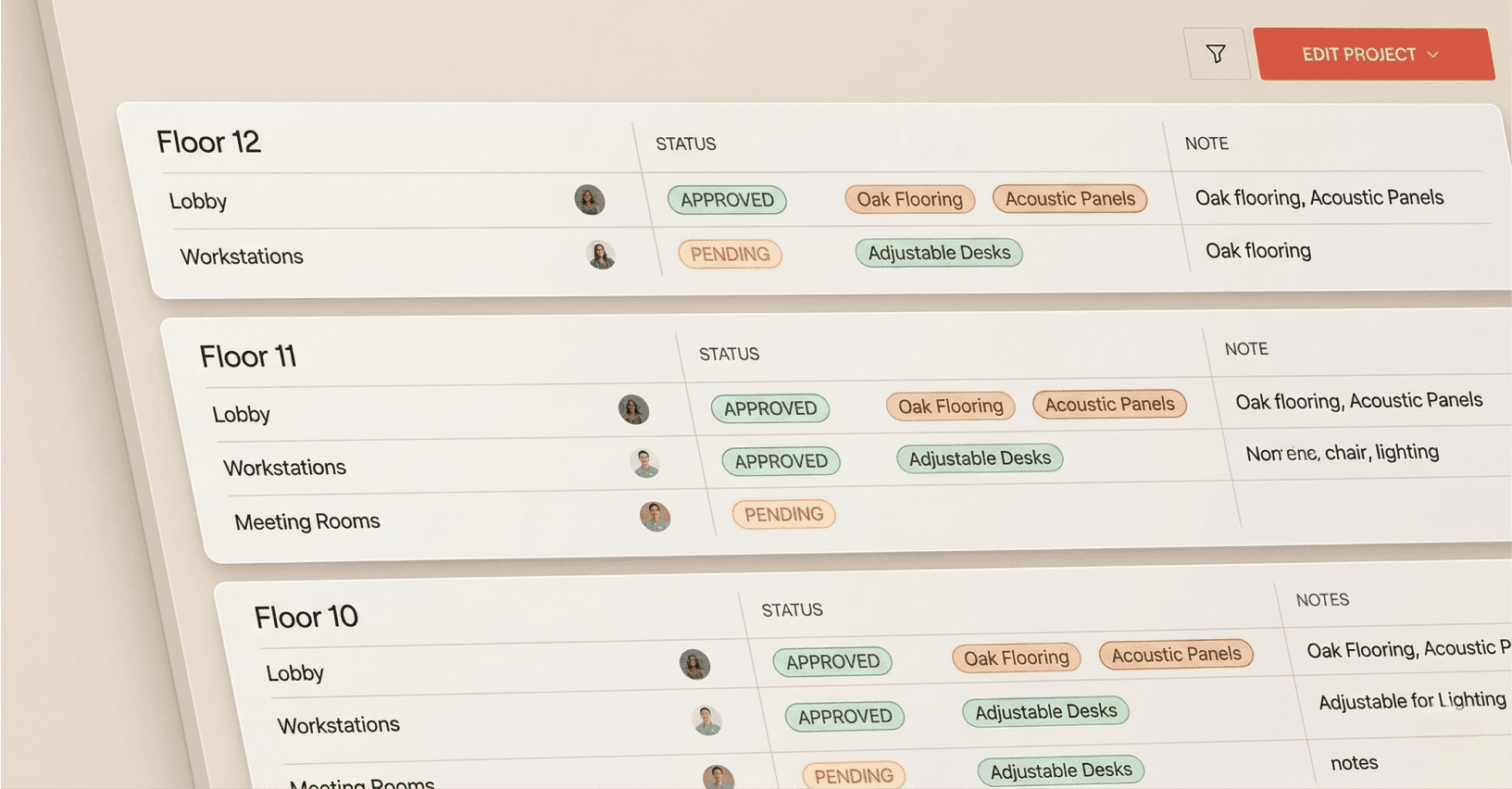
How does specification management software handle corporate multi-floor projects?
Corporate fit-outs involve
Stacked floors with shared finishes
Cross-zone coordination
Multiple approval layers
Contractor and procurement visibility requirements
When each floor is managed in a separate spreadsheet, consistency requires manual reconciliation at every phase gate. A centralised specification system maintains floor and zone organisation from a shared material library, with a controlled revision history and live visibility across teams that does not require the project lead to be the single point of knowledge.
Is specification management software suitable for high-end residential projects?
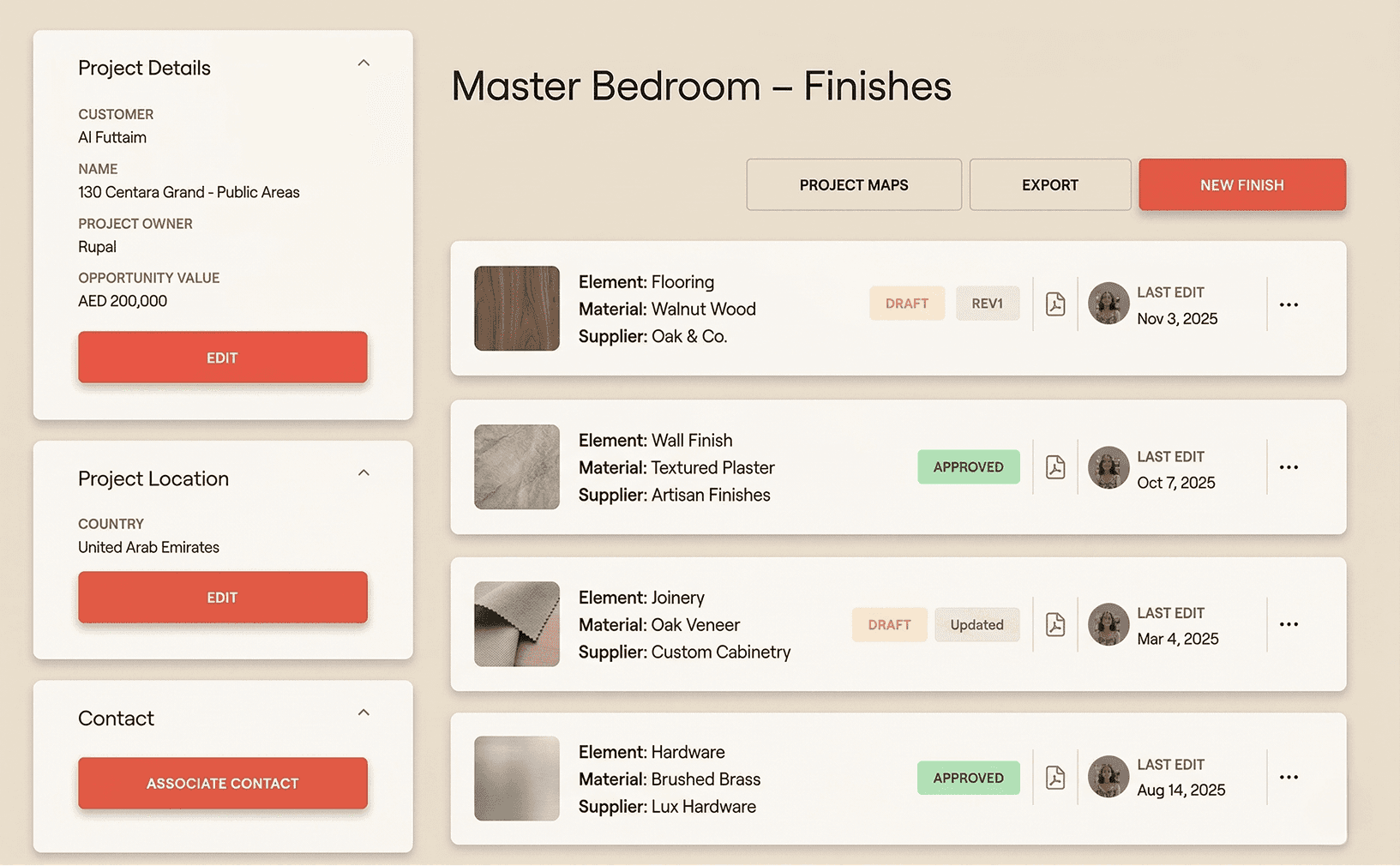
Yes, though the value proposition is different. In high-end residential, the driver is not scale but precision. Bespoke finishes, layered client approvals, premium supplier coordination, and frequent client-driven revisions create a workflow that benefits from item-level revision traceability, linked documentation, and presentation-ready outputs - even at relatively low SKU volumes. The administrative load reduction and the credibility of polished documentation matter here as much as the structural control that hospitality demands.
When should a growing studio implement specification software?
The right moment is before the system fails, not after. Studios that implement structured specification infrastructure when they are starting to feel the Excel limits — rather than waiting for a procurement error or a version dispute to force the issue — avoid the transition costs of migrating under pressure. The specific signals: version confusion appearing regularly, revision cascades requiring significant time to complete, new team members unable to orient themselves in the spec without a handover session, margin visibility only appearing at phase review rather than in real time.
How .STUDIO solves specification Complexity
How Does .STUDIO Structure Specifications Differently?
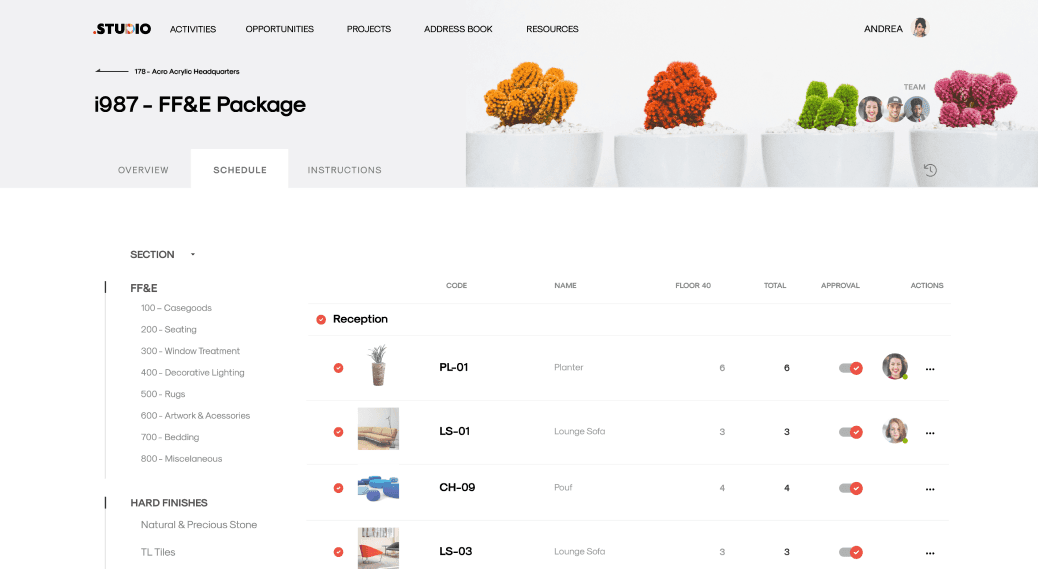
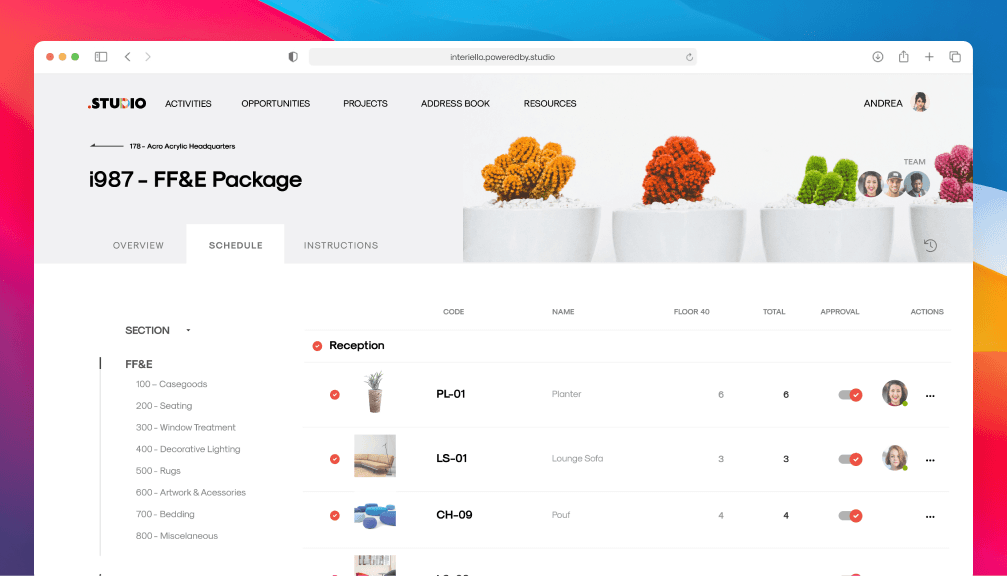
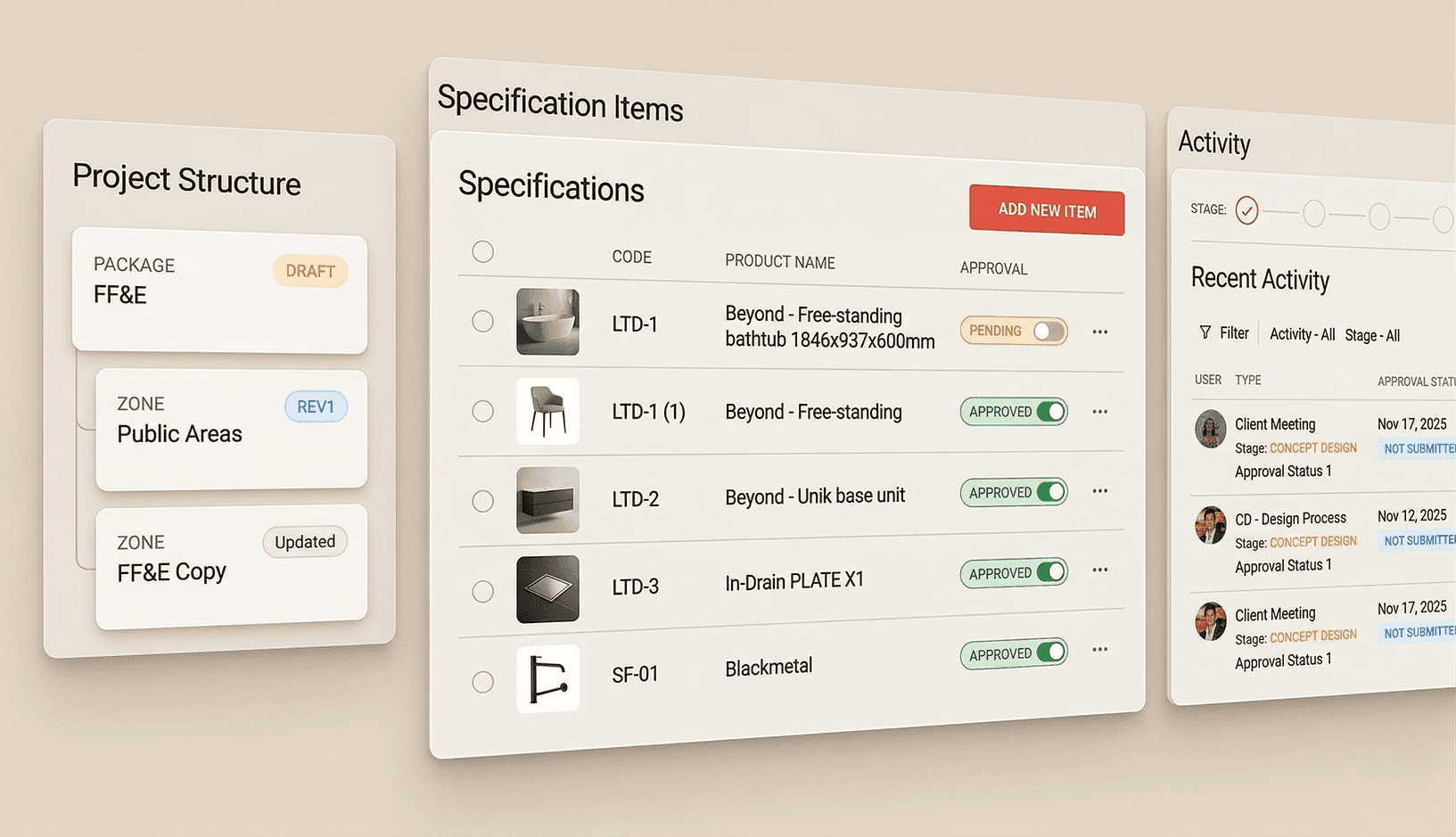
.STUDIO organises specifications by Project, Area, and Package - mirroring the spatial structure of the project rather than the category structure of a product catalogue. Room types are defined once. Every instance of that room type references the definition, so a change to the type propagates to every room automatically. This is the architectural difference that makes hospitality scale manageable rather than manually exhausting.
The 20,000+ product library from Love That Design sits within the platform, with manufacturer data, finishes, certifications, pricing, delivery timelines, and BIM/Revit families attached. When a designer specifies a product, the cost and margin impact is visible immediately. The spec and the budget are not separate documents that need reconciling at the end of the phase — they are the same data.
How Does .STUDIO Control Revisions?
Revisions are tracked at item level automatically. Every change creates a version record without anyone having to remember to save a new file or maintain a change log. The audit trail is complete by default, not by discipline. When a question arises about what was changed and by whom, the answer is in the system rather than in someone’s memory or inbox.
Comments and mentions are attached to items, not to separate email threads. The discussion that led to a product change lives alongside the change, not in a chain of replies that only two people can find.
Each specification includes:
Controlled version history
Visible change tracking
Linked documentation
Status indicators
Approval state visibility
This eliminates overwritten cells, lost updates, and email-based revision confusion.
How Does .STUDIO Manage Approvals?
Approvals are embedded in the specification at item level. A sign-off is recorded against the specific version of the item that was approved, not against a document that has since been updated. When a client or procurement agent queries what was agreed at a particular phase, the answer is retrievable in seconds - not a matter of searching an inbox for the right thread.
External users - clients, vendors, procurement agents - can be given controlled visibility with granular permissions. They see what they are meant to see. They cannot edit what they are not meant to edit.
Design teams can:
Assign approval states
Track stakeholder sign-offs
Monitor pending decisions
Prevent unauthorized edits
Approval visibility reduces misalignment between designers, clients, and contractors.
How does .STUDIO generate specification outputs?
Specification books, tear sheets, cut sheets, and submittal packages are generated directly from the live specification data. There is no InDesign rebuild after every revision round. A studio that currently spends a day reformatting a specification book before each client issue can do it in under an hour, from the current spec, with both studio and client branding applied.
This is not a marginal time saving. For a studio issuing three or four documents per project phase across eight concurrent projects, the cumulative overhead of manual output production is significant. Eliminating it is one of the clearest return-on-investment arguments for switching.
Is .STUDIO the right tool for every interior design studio?
.STUDIO is not built for every studio, and it is worth being direct about that. A solo designer managing two residential projects a year with limited procurement complexity does not need this level of infrastructure. Excel, used with discipline, is adequate at that scale.
.STUDIO is built for studios where specification is the operational backbone — where complexity, concurrent volume, and the cost of errors make manual coordination genuinely expensive. The specific threshold: five or more concurrent projects, FF&E budgets above £75k per project, multiple designers working on the same specification simultaneously. Below that threshold, the overhead of adoption exceeds the return. Above it, the cost of not having it is embedded in every project.
How Does .STUDIO Reduce Administrative Overload?
By centralizing product data and eliminating duplication, .STUDIO reduces:
Manual re-entry
Spreadsheet formatting
Cross-document inconsistencies
Time spent reconciling revisions
Teams spend less time managing data and more time designing.
Summary
.STUDIO does not digitize spreadsheets.
It introduces structured, room-based infrastructure that:
Scales with project complexity
Controls revision risk
Aligns approvals
Connects specifications to delivery
It is built for firms managing finish-heavy, multi-phase commercial environments.
“What I thought was really interesting about .STUDIO is that we can use and take it further. It has a lot of different components to it for the business. It isn’t just focused on the design part, but there is a financial and business development model part, too. It’s a long term investment since we can work effectively under one platform.”
— Kristina Zanic, Owner · Kristina Zanic Consultants · Dubai’s leading hospitality design studio
Operational Visibility & Control
What operational visibility does .STUDIO provide beyond specification management?
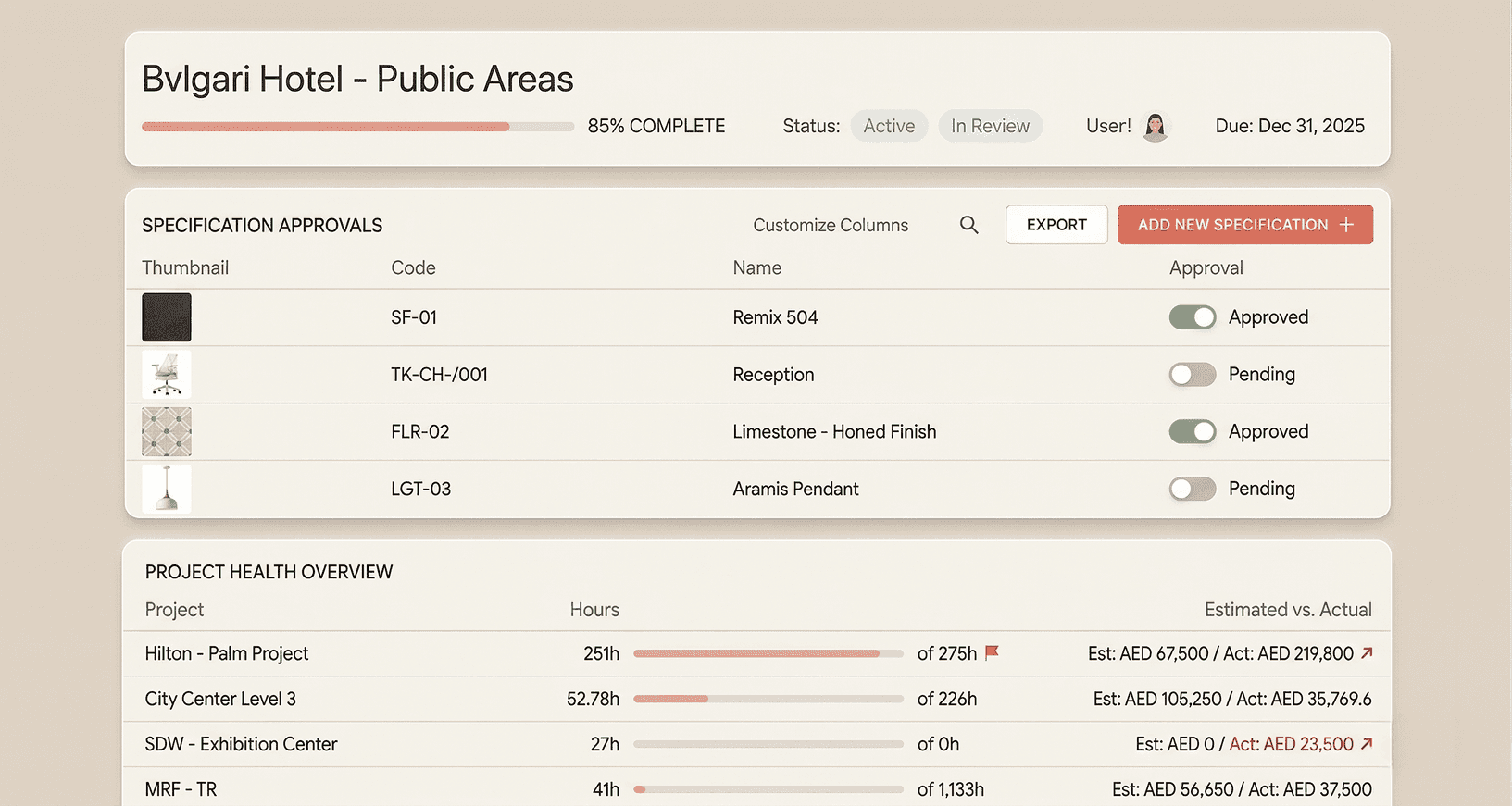
Specification management is the core, but it is not the ceiling. .STUDIO connects specifications to project timelines, resource allocation, procurement tracking, timesheets, and invoicing. The specification is not an isolated document — it is the operational centre of the project, and the system is organised around it.
A principal opening the platform can see, across all live projects, which specifications are at risk, which have open revision items, which are approaching handover with outstanding approvals, and where team capacity is concentrated. That visibility does not require asking anyone. It is available by default.
How does specification visibility protect margin?
The margin that erodes in commercial interior design projects rarely appears on a single line item. It accumulates in the hours spent reconciling versions, correcting errors that reached procurement, rebuilding documents that should have been generated, and managing approval confusion that should have been prevented. These costs are absorbed into studio overhead, which is absorbed into project margin, which is why they are rarely visible until handover.
A specification system that makes revision status, approval state, and cost implications visible in real time gives the studio the ability to intervene before these costs compound. The margin protection is indirect but consistent. Studios that manage specification with structural control deliver projects with fewer errors, fewer rework rounds, and less administrative overhead than studios managing the same complexity manually.
How Does This Protect Margin?
Manual coordination increases:
Duplicate data entry
Rework from missed revisions
Delays in approvals
Misalignment with contractors
Structured visibility reduces:
Administrative overhead
Revision errors
Approval friction
Untracked scope changes
As complexity increases, visibility directly impacts profitability.
How does .STUDIO support studio growth?
Growth creates complexity faster than discipline can absorb it. A studio that managed six projects adequately on Excel finds that managing twelve is not twice the discipline — it is a qualitatively different problem. The version confusion, the revision cascades, the approval misalignment that were occasional events become regular ones. Structural control is what separates studios that grow smoothly from studios that grow into chaos.
.STUDIO provides the operational infrastructure for scaling: repeatable project structure, cross-project consistency, team accountability without micromanagement, and controlled documentation that does not depend on the institutional knowledge of the person who set up the spreadsheet.
Studios scaling into larger commercial or hospitality projects require:
Repeatable structure
Cross-project consistency
Team accountability
Controlled documentation
Operational visibility ensures that growth does not introduce chaos.
Structure becomes a competitive advantage.
Summary
Specification management is not just about organizing line items.
It is about creating operational clarity across complex design environments.
.STUDIO connects specifications to workflow, approvals, and delivery — enabling firms to manage complexity with control instead of manual coordination.
Frequently Asked Questions
Is specification management software only for large commercial firms?
No. The threshold for needing structured specification infrastructure is not firm size - it is project complexity and concurrent volume. A 10-person studio managing multiple concurrent hospitality projects needs it. A 30-person studio doing straightforward residential work may not. The signal is when manual coordination is consuming design time rather than supporting it.
Is specification management software better than Excel?
For small, low-complexity projects: no. Excel is adequate and the overhead of adopting purpose-built software is not justified. For studios managing 200+ line items per project, multiple concurrent projects, or hospitality and commercial work with repeating room types: yes. The structural limitations of Excel - no item-level revision tracking, no embedded approvals, no live output generation - become genuine operational risk at that scale.
Does .STUDIO replace project management software?
For small, low-complexity projects: no. Excel is adequate and the overhead of adopting purpose-built software is not justified. For studios managing 200+ line items per project, multiple concurrent projects, or hospitality and commercial work with repeating room types: yes. The structural limitations of Excel - no item-level revision tracking, no embedded approvals, no live output generation - become genuine operational risk at that scale.
Can .STUDIO handle hospitality and multi-site projects?
Yes. Hospitality is the primary use case, not an afterthought. Room type structure, automatic propagation, FF&E and OS&E in one system, brand standard control, revision tracking across sites, and multi-package visibility were built into the architecture from the start. The 14-minute demo includes a walkthrough of how a hospitality project is structured, not a generic product tour.
Is .STUDIO the right tool for every studio?
No. If you are a smaller studio working on straightforward projects with limited concurrent complexity, the answer is probably not yet. Excel, used carefully, is adequate below the threshold. The guide to switching covers how to tell when you have crossed it and what the migration looks like when you have.
When should a studio move from spreadsheets to specification software?
The practical threshold: five or more concurrent projects, FF&E budgets above £75k per project, multiple designers working on the same specification simultaneously. The experiential signal: version confusion is appearing regularly, revision cascades are a significant time cost, new team members cannot orient themselves in the spec without a handover session, and margin visibility only arrives at phase review rather than in real time.
Studios should consider migrating when they experience:
Version confusion
Approval delays
Duplicate data entry
Increasing SKU volume
Reduced visibility across projects
If administrative coordination is consuming design time, structured systems provide operational relief.
Does specification software improve profitability?
Indirectly, and consistently. The mechanism is not a direct cost reduction - it is the elimination of the hidden costs that accumulate in manually coordinated specification workflows: rework from revision errors, time spent reconciling versions, InDesign rebuild sessions, and the administrative overhead that displaces design hours. In large commercial and hospitality projects, the saving in these costs is measurable. It does not show up as a line item until you look for it.
See how specification Management Works in practice
Ready to Replace Spreadsheet Coordination with Structured Control?
If your projects involve:
Multi-floor environments
Repeating room types
High SKU volume
Layered approvals
Finish-heavy schedules
Structured specification management becomes essential.
.STUDIO provides a centralized, room-based system designed for commercial interior design and architecture firms managing complexity at scale.
What to Expect in a Demo
The 14-minute demo is a walkthrough of how a studio like yours would actually use the platform - not a generic product tour with feature checkboxes. Depending on your project type, the demo will cover how room-based structuring works in practice for hospitality or commercial environments, how revisions are controlled without manual cascade, how approvals are tracked without email threads, and how a specification book is generated from live data.
Same-day slots are usually available. There is no sales pitch before you have seen the product. The conversation starts with your workflow, not with a pricing slide.
free expert workflow audit
Book a Workflow Audit: See Exactly Where Your Studio Is Losing Time
LIMITED TIME OFFER FOR ARCHITECTURE AND DESIGN STUDIOS
Your audit is a tailored operational assessment designed specifically for interior design and architecture firms. Book your 30 minute session with our .STUDIO Consultant. Same-day slots usually available. Your audit report will:
Map your current specification and project workflows
Identify duplicate data entry and version-control risks
Highlight resource visibility gaps
Quantify potential time savings
Outline a phased plan to replace spreadsheets safely
This is not a generic demo. It is a tailored operational assessment designed specifically for interior design and architecture firms.
If you are considering architecture workflow software or looking for a serious alternative to Excel for your design firm, this is the first step.
For Growing Studios
If you are scaling from spreadsheets but not yet managing large commercial environments, the demo will focus on:
Implementing structure early
Reducing administrative overhead
Preparing for project growth