
Invoicing — Now Available
.STUDIO ties every invoice to a project stage — so billing triggers automatically, nothing slips through, and your accounts always match your delivery.
The old way
Sound familiar?
Most studios invoice reactively — when someone remembers. That's how you lose money quietly.
Dashboard
Everything in one place. Finally.
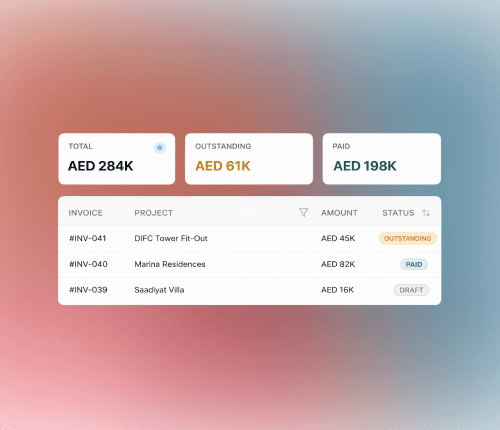
One view of every invoice across every project — filterable by status, stage, or amount. No more digging.
Filter by Draft, Outstanding, or Paid
Total invoiced, outstanding, overdue — at a glance
Customisable columns with tax toggle
Smart Triggers
Billing that follows your delivery.
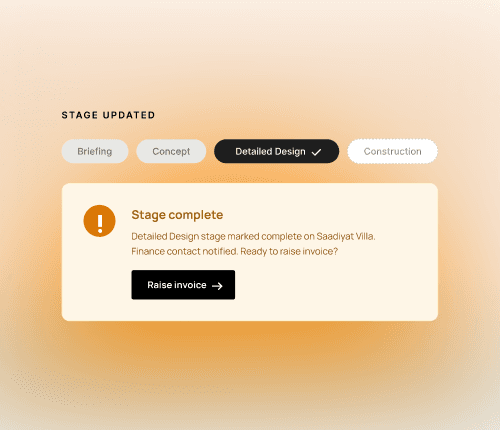
When a project stage completes, .STUDIO automatically prompts your finance contact to raise an invoice. No reminder needed. No invoice missed.
Stage change → instant finance notification
Every invoice linked to the stage that earned it
Spot under-billed stages in the revenue report
Xero Integration (Coming soon)
One entry. Two systems. Zero gaps.
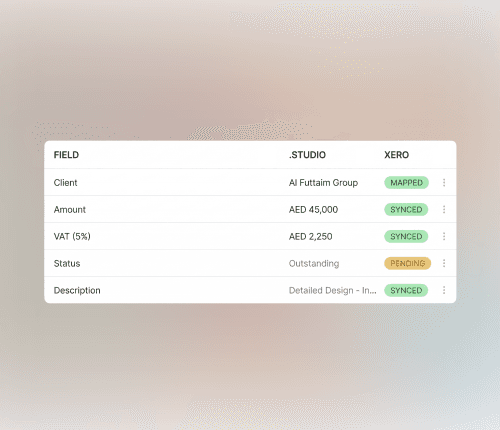
Push invoices directly into Xero — with client, amounts, tax, and stage descriptions. Payment status syncs back automatically.
Push invoices to Xero with one click
Contact mapping prevents duplicates
Xero marks payment → .STUDIO updates instantly
VAT and compliance handled via Xero's rules engine
0
0
0
0
x
x
x
manual reminders needed to trigger billing
1
1
1
1
central dashboard for all project invoices
2
2
2
2
x
x
x
entries eliminated with Xero sync
∞
∞
∞
∞
excuses removed for late invoicing
Process
From project stage to paid — in three steps
No more "we'll invoice at the end of the month." Billing follows the work, automatically.
Stage marked complete
Your project moves to the next stage in .STUDIO. The system detects the trigger.
Status
In progress
Early access open

Book a 20-minute walkthrough and see how .STUDIO turns project progress into consistent, trackable revenue — without the admin overhead.
No commitment. 20 minutes. We'll show you the full invoicing flow live.